The goal of this blag post is to get a legacy software used by teachers to run under Linux. The software is used to put grades of pupils into a database.
 # Target Software
Thanks for reading my highbrow title. To stay in character, I will first mansplain some details about Germany's educational system: Germany consists of a bunch of states. And a funny quirk is that every state can pretty much decide how to do education. I'm explaining this because otherwise the following sentence might sound unnecessary: We will focus on the state of North Rhine-Westphalia (NRW) in this post. It might very well be though that it's the same or similar for other states.
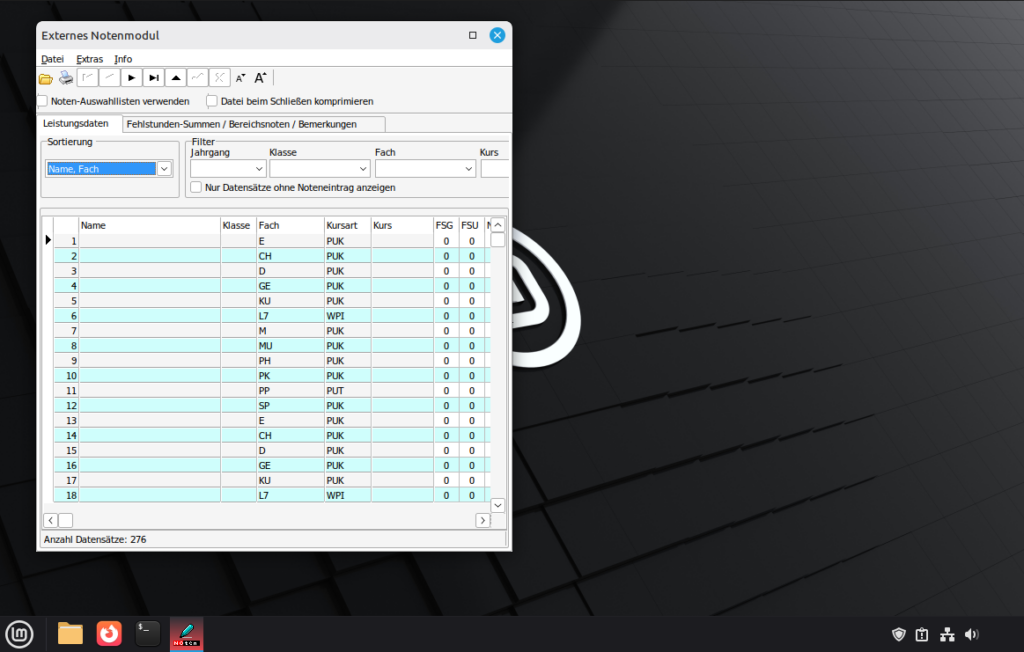
Anyway: NRW has a website where teachers can download software they might need: svws.nrw.de. Under "SchILD-NRW 2" you can find the download of the software in question. Don't ask me what "SchILD" stands for, but the word "Schild" is German and means "shield". It has nothing to do with The Avengers. Anyway, the download is under https://www.svws.nrw.de/schild-nrw2/schild-nrw2-tools-download in the sub section "Alte externe Verwaltung von Leistungsdaten für Schild-NRW".
# Target Software
Thanks for reading my highbrow title. To stay in character, I will first mansplain some details about Germany's educational system: Germany consists of a bunch of states. And a funny quirk is that every state can pretty much decide how to do education. I'm explaining this because otherwise the following sentence might sound unnecessary: We will focus on the state of North Rhine-Westphalia (NRW) in this post. It might very well be though that it's the same or similar for other states.
Anyway: NRW has a website where teachers can download software they might need: svws.nrw.de. Under "SchILD-NRW 2" you can find the download of the software in question. Don't ask me what "SchILD" stands for, but the word "Schild" is German and means "shield". It has nothing to do with The Avengers. Anyway, the download is under https://www.svws.nrw.de/schild-nrw2/schild-nrw2-tools-download in the sub section "Alte externe Verwaltung von Leistungsdaten für Schild-NRW".
# Target Software
Thanks for reading my highbrow title. To stay in character, I will first mansplain some details about Germany's educational system: Germany consists of a bunch of states. And a funny quirk is that every state can pretty much decide how to do education. I'm explaining this because otherwise the following sentence might sound unnecessary: We will focus on the state of North Rhine-Westphalia (NRW) in this post. It might very well be though that it's the same or similar for other states.
Anyway: NRW has a website where teachers can download software they might need: svws.nrw.de. Under "SchILD-NRW 2" you can find the download of the software in question. Don't ask me what "SchILD" stands for, but the word "Schild" is German and means "shield". It has nothing to do with The Avengers. Anyway, the download is under https://www.svws.nrw.de/schild-nrw2/schild-nrw2-tools-download in the sub section "Alte externe Verwaltung von Leistungsdaten für Schild-NRW".
e8d311ee6a87ecc68dd479b0a3a3d9469cc044002ea4734e8c151df0f6be054e ExtNotMod3.exe
sudo dpkg --add-architecture i386

sudo mkdir -pm755 /etc/apt/keyrings
sudo wget -O /etc/apt/keyrings/winehq-archive.key https://dl.winehq.org/wine-builds/winehq.key
sudo wget -O /etc/apt/sources.list.d/winehq-noble.sources https://dl.winehq.org/wine-builds/ubuntu/dists/noble/winehq-noble.sources

sudo apt update
sudo apt install --install-recommends winehq-stable winetricks

wine --version
wine-10.0 or so.
Now let's use the winetricks helper script to install a couple required dependencies for SchILD-NRW. Let's also set a WINEPREFIX to keep things tidy:
export WINEPREFIX=~/.wine-notenmodul
WINEARCH=win32 wineboot --init
winetricks jet40
winetricks mdac28
WINEPREFIX=~/.wine-notenmodul wine ~/path/to/ExtNotMod3.exe
~/.local/share/applications/notenmodul.desktop with the following content (obviously, adjust path names):
[Desktop Entry]
Name=Notenmodul
Comment=SchILD-NRW Externes Notenmodul (via Wine)
Exec=env WINEPREFIX=/home/YOUR_USERNAME/.wine-notenmodul wine /home/YOUR_USERNAME/Notenmodul/ExtNotMod3.exe
Type=Application
Icon=wine
Categories=Education;
Terminal=false