<center>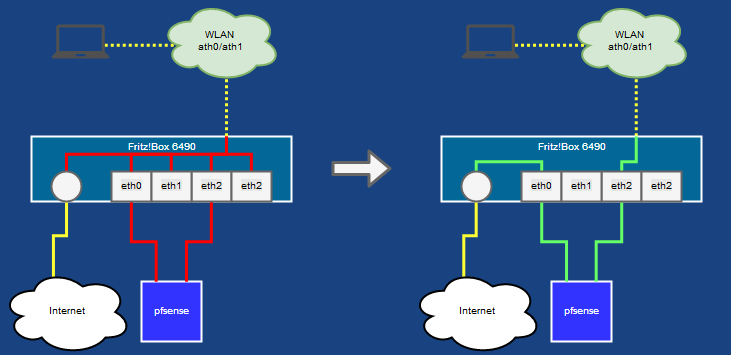</center>
I installed a pfSense firewall behind my Fritz!Box Router, that does several jobs like VPN, Adblocking, etc. What always bothered me was, that this firewall could be easily bypassed by Wireless clients, because I am using my Fritz!Box as a wireless AP and therefore not physically isolated from the Internet connection. One could just set the Fritz!Box IP as the default gateway and bypass pfSense.
If you have ssh access to your Fritz!Box you can fix this!
<span id="more-4441"></span>
1. You need at least FritzOS 6.8X
2. You need SSH (or telnet) access to your Fritz!Box. For this I am using fesc's ffritz ((https://bitbucket.org/fesc2000/ffritz )) repository.
3. You need socat on your Fritz!Box. The main OS is running on an Intel atom core, so I guess any statically linked x86 binary will do.
4. Edit `/var/flash/ar7.cfg`:
* you have to use `nvi` as editor!
* find the `brinterfaces` entry
* split this:
```
{
name = "lan";
dhcp = no;
ipaddr = 192.168.178.1;
netmask = 255.255.0.0;
dstipaddr = 0.0.0.0;
interfaces = "eth0", "eth1", "eth2", "eth3", "ath?",
"wdsup?";
dhcpenabled = no;
dhcpstart = 0.0.0.0;
dhcpend = 0.0.0.0;
is_guest = no;
is_hotspot = no;
multicast_snooping = yes;
is_public = no;
}
```
into something like this:
```
{
name = "lan";
dhcp = no;
ipaddr = 192.168.178.1;
netmask = 255.255.0.0;
dstipaddr = 0.0.0.0;
interfaces = "eth0", "eth1", "eth3";
dhcpenabled = no;
dhcpstart = 0.0.0.0;
dhcpend = 0.0.0.0;
is_guest = no;
is_hotspot = no;
multicast_snooping = yes;
is_public = no;
} {
name = "internal";
dhcp = no;
ipaddr = 192.168.1.1;
netmask = 255.255.255.0;
dstipaddr = 0.0.0.0;
interfaces = "eth2", "ath?", "wdsup?";
dhcpenabled = no;
dhcpstart = 0.0.0.0;
dhcpend = 0.0.0.0;
is_guest = no;
is_hotspot = no;
multicast_snooping = yes;
is_public = no;
}
```
5. configure `hostapd`:
Important: you __have__ to end each line with `CTRL+d`. Hitting return might crash hostapd.
```
# /tmp/socat STDIO UNIX-CONNECT:/var/run/hostapd/global,type=2,bind=/tmp/mysocktest; rm /tmp/mysocktest
REMOVE ath0
ADD ath0 /var/run/hostapd
REMOVE ath1
ADD ath1 /var/run/hostapd
# /tmp/socat STDIO UNIX-CONNECT:/var/run/hostapd/ath0,type=2,bind=/tmp/mysocktest; rm /tmp/mysocktest
SET ssid YOURSSIDHERE
SET bridge internal
SET eap_server 1
SET wpa_passphrase YOURSUPERSECRETPASSWORTHERE!
SET wpa_key_mgmt WPA-PSK
SET wpa 2
SET wpa_pairwise CCMP
SET rsn_pairwise CCMP
SET ieee80211w 0
SET wps_state 0
ENABLE
# /tmp/socat STDIO UNIX-CONNECT:/var/run/hostapd/ath1,type=2,bind=/tmp/mysocktest; rm /tmp/mysocktest
SET ssid YOURSSIDHERE
SET bridge internal
SET eap_server 1
SET wpa_passphrase YOURSUPERSECRETPASSWORTHERE!
SET wpa_key_mgmt WPA-PSK
SET wpa 2
SET wpa_pairwise CCMP
SET rsn_pairwise CCMP
SET ieee80211w 0
SET wps_state 0
ENABLE
```
and thats it. These changes are not reboot safe. If you mess up, just reboot your box. If you want it permanent: write a small script, that runs at boot time!